|
|
Joined: Aug 2015
Posts: 202
Apprentice level 3
|
Hi all,
Kye has indicated he has an issue with an image apparently rotating 90 degrees when it was uploaded whilst appearing 'normal' elsewhere. I have had exactly the same issue with one particular image. Had to edit and resave on PC and then upload it. This might even have involved photobucket as well, not sure.
I will have to test and see if I can find the offending image and replicate the issue.
One thing I might play with is the orientation metadata value and see if that has any effect.
Is there a 'private' test area where I can practice-post without disturbing others (e.g. through active/newest topics or posts)?
Otherwise I can do a PM just to myself and hope that it would replicate effects for public posts.
Patrick
|
|
|
|
|
Joined: Nov 2015
Posts: 637 Likes: 1
Qualified Senior
|
I hate it, happens all the time. ![[Linked Image]](https://www.outdoorking-forum.com.au/forum/uploads/usergals/2016/03/full-9734-27517-img_0135.jpg)
Thanks for reading!
|
|
|
|
|
Joined: Nov 2013
Posts: 6,938 Likes: 322
Forum Historian
|
Hello Patrick & Kye Thanks Patrick for offering to help here. I downloaded Kye's image, inverted it and re-named it. I feel the issue arises with the OS and device the member uses. Kye, what device are you using to upload your images? That your image was uploaded in another rotation this time is significant. I feel the image is being written with data from your OS that our image up-loader cannot correct. Patrick, just play around in this topic post if you like. That will give it real-world testing. I can delete stuff later. Kye, I understand now that if this is regularly happening to you it would be quite annoying. I am not convinced the issue is with our uploader - but stranger things have happened!*  Hope this helps. Hope this helps.--------------------- Jack ![[Linked Image]](https://www.outdoorking-forum.com.au/forum/uploads/usergals/2016/03/full-7392-27521-kyle_image.jpg) * Donald Trump
|
|
|
|
|
Joined: Nov 2015
Posts: 637 Likes: 1
Qualified Senior
|
I am using Windows 10 to upload the images. If thats what your looking for.
Thanks for reading!
|
|
|
|
|
Joined: Jan 2016
Posts: 8,215 Likes: 235
SENIOR TECHNICIAN
|
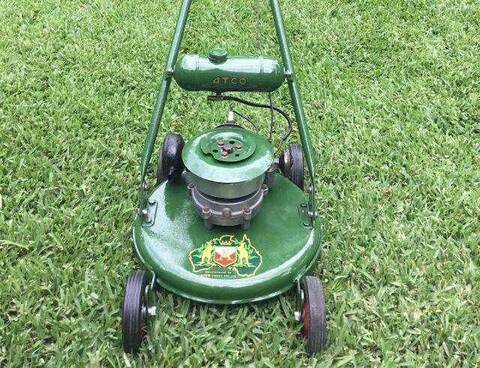
Kye, too easy, put the motor and the fuel can upside down and then take your photo
|
|
|
|
|
Joined: Nov 2015
Posts: 637 Likes: 1
Qualified Senior
|
knowing my luck it would be the one time it ends up the right way!
Thanks for reading!
|
|
|
|
|
Joined: Nov 2013
Posts: 6,938 Likes: 322
Forum Historian
|
G'day Norm That's brilliant! I'm not a technical guy at all - I just try and ask the right questions to pass on to others in the know. I feel these issues must be conducted with good will. Thanks for the humour mate. I am using Windows 10 to upload the images. If thats what your looking for. Hello Kye, Just doing my best mate ... I also need to confirm the device you are uploading from. PC, tablet ... Thermomix? ------------------ Jack
|
|
|
|
|
Joined: Jan 2016
Posts: 387
Apprentice level 4
|
knowing my luck it would be the one time it ends up the right way! Bloody Hell Kye, Your the only bloke I know that can't walk out his front door without tripping over something cool and rare. Your one of the luckiest buggers I know!
This
Is going straight to the pool room.
|
|
|
|
|
Joined: Nov 2015
Posts: 637 Likes: 1
Qualified Senior
|
I couldn't do it without my dad slash, i'm only 14 so without him I couldn't drive anywhere haha!
Jack I am on an HP Pavilion laptop, so i'm pretty sure its a PC.
Thanks for reading!
|
|
|
|
|
Joined: Mar 2015
Posts: 567 Likes: 2
MOD & GREENFIELD TECHNICIAN
|
Only in America, Jack, only in America
|
|
|
|
|
Joined: Jun 2015
Posts: 179 Likes: 4
Recycling and Repairs
|
I uploaded this into a post the other day and it showed upside down, but is right way up on my Windows 10 desktop. ![[Linked Image]](https://www.outdoorking-forum.com.au/forum/uploads/usergals/2016/03/full-9311-27524-img_2643.jpg) As you can see, again, it comes into the post upside down, so it is something weird that may be related to Windows 10. Hope this is of some assistance.
Environmentally friendly recycling at it's best
|
|
|
|
|
Joined: Jun 2015
Posts: 179 Likes: 4
Recycling and Repairs
|
Now I am curious if it is just this photo, so here are three of a mower I have been working on: - ![[Linked Image]](https://www.outdoorking-forum.com.au/forum/uploads/usergals/2016/03/full-9311-27525-victa_utility_orange_160cc_push_mower_21.jpg) ![[Linked Image]](https://www.outdoorking-forum.com.au/forum/uploads/usergals/2016/03/full-9311-27526-victa_utility_orange_160cc_push_mower_22.jpg) ![[Linked Image]](https://www.outdoorking-forum.com.au/forum/uploads/usergals/2016/03/full-9311-27527-victa_utility_orange_160cc_push_mower_23.jpg) These imported correctly, so now, wondering if it could be something to do with the photo aspect when cropped, with the above being full Portrait style compared to my engine that is almost Square, I uploaded one below I thought was square(ish), but it imported okay as well. ![[Linked Image]](https://www.outdoorking-forum.com.au/forum/uploads/usergals/2016/03/full-9311-27528-kawasaki_td24_brush_cutter_4.jpg) So much for that theory. Why????
Environmentally friendly recycling at it's best
|
|
|
|
|
Joined: Jan 2016
Posts: 387
Apprentice level 4
|
G'day Bushy, just a wee bit off topic but nice looking utility. What paint did you use on it? How close to the original colour is it?
This
Is going straight to the pool room.
|
|
|
|
|
Joined: Jun 2015
Posts: 179 Likes: 4
Recycling and Repairs
|
Hi slashnburn. Thank you. I was just making it look pretty. Paint is $9 White Knight multi-purpose enamel from the local hardware, but even after 3 months or so, petrol spills still affect it, so not happy with that scenario and I'm not sure what to do about it. Colour wise, it's a bit brighter than original, but the closest I could find. Handlebars were suppose to be off-white, but looks more cream to me, which is probably why my brother-in-law said it now looks like a Husqvarna... :-)
Environmentally friendly recycling at it's best
|
|
|
|
|
Joined: Jan 2016
Posts: 387
Apprentice level 4
|
Thanks mate I have one a little older that I want to paint up soon so I'm keeping my eye out for a good close match.
This
Is going straight to the pool room.
|
|
|
|
|
Joined: Nov 2013
Posts: 6,938 Likes: 322
Forum Historian
|
Alright
Bushy and Kye -
Could you tell us what type of camera took the photos in issue,
and how they were uploaded to your PC (wire or wire-less).
------------------
Jack
|
|
|
|
|
Joined: Jan 2016
Posts: 387
Apprentice level 4
|
If it's of any help I take photos on my iPhone and plug it into the macbook air. I have never had a spot of bother.
This
Is going straight to the pool room.
|
|
|
|
|
Joined: Nov 2015
Posts: 637 Likes: 1
Qualified Senior
|
I just used an Iphone camera and put them on my pc with a wire
Thanks for reading!
|
|
|
|
|
Joined: Jan 2016
Posts: 387
Apprentice level 4
|
Do you edit the photos at all Kye?
This
Is going straight to the pool room.
|
|
|
|
|
Joined: Nov 2015
Posts: 637 Likes: 1
Qualified Senior
|
No slash, just straight up uploaded. Also when I post the same images on Facebook they are the right way up, only happens on Out Door King.
Thanks for reading!
|
|
|
|
|
Joined: Nov 2013
Posts: 6,938 Likes: 322
Forum Historian
|
Hello all
That the two images in question here were re-uploaded and the same
thing occurred would indicate the problem does not lie with the ODK
uploader but within the image itself.
It appears that the issue arises on smartphone cameras (Apple and Android)
when the image orientation becomes corrupted. Here are two easy fixes.
[1] In Windows: select Paint, File, Open (your photo image file), click Rotate Left or Rotate Right as appropriate (select "Flip Vertically" to turn the image upside down, or select "Flip Horizontally" to make a mirror image of the photo). Once the orientation is correct, whether or not you changed it, click on File > Save As > JPEG > accept or change the file name and location. This will set the image's default orientation as viewed, regardless of the original camera orientation.
On Mac: open Photos app > select File > Import >select file > Image in menu > Rotate Clockwise (or Counterclockwise) > File > Close or Share. You also can open the file in the Preview app > click Tools > Rotate Left or Right > File > Save.
[2] The image is rotating because you are saving the image in JPEG, if you save your image in PNG then the orientation will not change.
Just try this and re-post in this topic.
Hope this helps.
------------------------
Jack
|
|
|
|
|
Joined: Nov 2015
Posts: 637 Likes: 1
Qualified Senior
|
It worked Jack, I had to edit it so it was upside down, then make it up right and save again. ![[Linked Image]](https://www.outdoorking-forum.com.au/forum/uploads/usergals/2016/03/full-9734-27545-img_0135.jpg) Thanks Jack!
Thanks for reading!
|
|
|
|
|
Joined: Aug 2015
Posts: 202
Apprentice level 3
|
Hi all, done a little testing of my own. See my responses below, then my next post will be about what little experiment I performed. That the two images in question here were re-uploaded and the same
thing occurred would indicate the problem does not lie with the ODK
uploader but within the image itself. Not necessarily. It only indicates that the issue is repeatable. given the issue only seems to arise on this site but not people's devices this indicates that it is likely (not conclusive) that there may be an issue with the site. This may not be a fault with the site, but actually a feature if the site is set up this way. It appears that the issue arises on smartphone cameras (Apple and Android)
when the image orientation becomes corrupted. Sorry Jack, I don't understand how you come to the conclusion that the image is corrupted. If it was corrupted it wouldn't display properly, if at all and this would be across multiple devices. It is only showing an incorrect orientation on one, this site. Here are two easy fixes.
[1] In Windows: select Paint, File, Open (your photo image file), click Rotate Left or Rotate Right as appropriate (select "Flip Vertically" to turn the image upside down, or select "Flip Horizontally" to make a mirror image of the photo). Once the orientation is correct, whether or not you changed it, click on File > Save As > JPEG > accept or change the file name and location. This will set the image's default orientation as viewed, regardless of the original camera orientation.
On Mac: open Photos app > select File > Import >select file > Image in menu > Rotate Clockwise (or Counterclockwise) > File > Close or Share. You also can open the file in the Preview app > click Tools > Rotate Left or Right > File > Save.
[2] The image is rotating because you are saving the image in JPEG, if you save your image in PNG then the orientation will not change.
Just try this and re-post in this topic.
Hope this helps.
------------------------
Jack These are good workarounds. Yes the image is rotating in JPEG likely because of the EXIF metadata, this is how a device determines the correct orientation for viewing vs the orientation of the information. This is device (and program) dependent. When you edit and resave a JPEG, in my experience the program resets the orientation to the default Top-left (1) from whatever it was before and saves the image as displayed. This then resets the image so that it doesn't need some rotation to display properly, solving the issue. See next post. Wehn you save as a PNG, the EXIF metadata is stripped when you write a PNG file and so the orientation becomes fixed to the viewed orientation. See next post.
Patrick
|
|
|
|
|
Joined: Aug 2015
Posts: 202
Apprentice level 3
|
Test of EXIF Orientation Parameter in JPG/JPEG filesSynopsis:A test of EXIF orientation settings in JPG files by changing the orientation parameter only in the same file. Display of orientation is then dependent on the software and/or system used. Uploading to the outdoorking site removed the orientation effect of the EXIF orientation setting, rendering all images identical. Altering and resaving the files reset the orientation parameter to the default Top-Left (1) whilst maintaining the display orientation. Systems used laptop w/ Win XPPro SP3, XNView 2.12 image viewer. Iphone 3G phone and Panasonic TZ-15 camera. Yes it's all prehistoric, but it works. Procedure (Gist of it anyway, as it's getting late...early now!)1) Photo with 'sidewards orientation' (EXIF Orientation "Right-top (6)" ) chosen to test viewing on PC through OS and software and for upload to OutDoorKing (ODK). 2) Photo with 'normal orientation' (EXIF Orientation "Top-left (1)" ) chosen to test altering the orientation parameter. parameter altered and saved using XNView. Images then viewed in O/S, XNView and uploaded to ODK. Results (abridged, I wanna go to bed)A) Test of 'sidewards oriented image'- Image taken with Iphone 3G, downloaded to PC.
- Image orientation listed as right-top (6) so rotated 90 degrees anticlockwise
- Image displays normally in XNView, i.e. as I expected (rotated 90 degrees clockwise from the camera's point-of-view)
- Image displayed rotated 90 degrees anticlockwise in WinXP Explorer (i.e. as 'taken' from the camera's point-of-view)
- Image uploaded to ODK using ODK's image upload window (under Firefox on WinXP PC). Image displayed (when clicked on) rotated 90 degrees anticlockwise (i.e. as 'taken' from the camera's point-of-view) before upload all finalised. Image upload then discontinued.
B) Test of 'normal oriented image' manipulation- Image taken with Panasonic DMC-TZ15, downloaded to PC.
- Image orientation listed as top-left (1) so camera and human point-of-views align.
- Image then copied another 7 times to renamed files (2-8)
- Each renamed file has the orientation parameter adjusted corresponding to its number (2-8) and saved. Orientations are:
Orientation: Top-left (1) Should appear normal Orientation: Top-right (2) Should appear mirrored horizontally Orientation: Bottom-right (3) Should appear rotated 180� Orientation: Bottom-left (4) Should appear mirrored vertically Orientation: Left-top (5) Should appear rotated 90� anti-clockwise then mirrored vertically Orientation: Right-top (6) Should appear rotated 90� clockwise Orientation: Right-bottom (7) Should appear rotated 90� clockwise then mirrored vertically Orientation: Left-bottom (8) Should appear rotated 90� anticlockwise listed as - Images displays as expected in XNView, i.e. rotated as listed above
- Images displayed identically in original orientation for all orientations using WinXP explorer
- Images begun to be uploaded to ODK using the ODK upload window, after three appear in identical original orientation upload is discontinued.
C) Test of JPG and PNG file saving- Resaving a file as a JPG in XNView resets the EXIF orientation parameter to "Top-left (1)" so preserving the current image display orientation.
- JPGs often have a thumbnail attached to the file for quick icon display. the orientation of the thumbnail may not match the picture orientation especially if the EXIF orientation has been manually changed.
- Saving a file as a PNG strips the EXIF information and therefore saves in the displayed orientation.
Conclusions- The camera and camera-phone used here (which use JPEG files) both save the orientation information of the photo in an EXIF- Orientation parameter in a JPEG file.
- XNView is able to display the image in the correct EXIF orientation, this includes the thumbnail
- Win XP through Explorer is not able to display the images in the correct orientation, this is likely a result of the old OS.
- Upload to ODK through the standard file upload mechanism does not recognise the EXIF orientation information, as a result the orientation is stripped and incorrect unless it has been saved in the default "top-left (1)" orientation.
- File upload was not completed once the files were viewed to save time, space and a mess on your screen!
If you've read this far, you should probably really find something else to do...like fix a mower! Cheers,
Patrick
|
|
|
|
|
Joined: Jun 2015
Posts: 179 Likes: 4
Recycling and Repairs
|
Good morning CyberJack. I was in the middle of a Post Reply and accidentally closed my Internet page, however, I just found an interesting fact that I never noticed that may explain what is going on. When the photo is opened on both the iPhone and Desktop, these images show correctly, and saved right-way up to the desktop but, when using File Explorer on the Desktop to open the connected iPhone photo DCIM file, and looking closer at the larger photo tiles, these photos are actually showing upside down. I can't explain why they look right-way up on both the iPhone and Desktop, and both copy to the Desktop right-way up, yet when viewing through file explorer they are upside down, which may be why they imported to ODK upside down. Maybe Kye can review his photos using his computer File Explorer, as I have and verify if the rotation of his photo is actually upside-down or not? Here's another photo of the machine I took that is right-way up, yet upside down when viewed in File Explorer. ![[Linked Image]](https://www.outdoorking-forum.com.au/forum/uploads/usergals/2016/03/full-9311-27560-img_2644.jpg) Based on the above, I have hunted another photo on my iPhone that shows it upside down in File Explorer, and I have just copied it to my Desktop and both iPhone and Desktop views show them to be the right-way up. This may be the answer we are looking for. ![[Linked Image]](https://www.outdoorking-forum.com.au/forum/uploads/usergals/2016/03/full-9311-27561-img_2470.jpg) Daryl.
Environmentally friendly recycling at it's best
|
|
|
|
|
Joined: Nov 2013
Posts: 6,938 Likes: 322
Forum Historian
|
G'day Bushy, Kye & PatrickBushy, this is good news and it confirms what I outlined above. When the device is connected you're seeing the orientation as seen on your iphone. However, File Explorer (or equivalent) is seeing the saved image itself (and it is reading the orientation information(?)). This makes things easier in that you will know in advance what images will pose an issue on ODK (or other forums that have this problem). You only need to correct the dodgy image(s) via means I outlined. I also understand that a basic photo editor on your mobile device itself could correct this prior to upload to your PC. Perhaps Patrick could assist there. I haven't understood cameras since my first mobile:- ![[Linked Image]](https://www.outdoorking-forum.com.au/forum/uploads/usergals/2016/03/full-7392-27576-photos_600x464.jpg) Summary SummarySo... for me, I upload to PC and check everything uploaded after disconnection of the mobile device. Any problem issues I correct by the rotate and 'save as' method. It's annoying, and there are no shortage of sites discussing this very issue. http://rotatemailer.com/rotate-mailer-in-action.htmlor http://iphonephotographyschool.com/iphone-photos-upside-down/In any case, we now have a better understanding of how the jpeg format combined with mobile devices can cause some problems with forum uploaders. Thanks to all for helping fix this annoying problem with a simple workaround. Hope this helps.------------------------- Jack
Last edited by CyberJack; 17/03/16 11:00 AM. Reason: Added image.
|
|
|
|
|
Joined: Aug 2015
Posts: 202
Apprentice level 3
|
Hi Jack, I've heard of rear view cameras but that (pic in your last post) is ridiculous! 
Patrick
|
|
|
|
|
Joined: Aug 2015
Posts: 202
Apprentice level 3
|
I'll try and keep this short(er)-and-sweet(er). A bit more testing today of the same rotated images on differing OSes. BAsically copied them to a USB stick and plugged it in for reading with as many different programs I could quickly lay my hands on. Win7Copied and viewed the images on a Win7 PC. Won't= won't rotate and/or reflect/flip, will= well, you figure it out!:) - Explorer/File Explorer won't
- Irfanview will
- Photoshop CC 2014.2.2 will
So Jack is correct that the basic file Explorer won't show the orientation properly. I was surprised that it's still this way on Win7, (don't have a Win10 to test on) unless there's a compelling reason then that's just sloppy and lazy from Microsoft and deserves a  ! Don't ususally like Macs but in this case good on Apple for maintaining consistency. Android (4.4.4 on a Nexus 7 2013)Now this gets interesting. Android will allow the rotate but not the flip/mirror! You need an app to do anything on Android. - ES File Explorer Image Browser won't
- Gallery will rotate only
- Photos will rotate only
- Cymera will rotate only
- Total Commander will rotate only
- Ghost commander will rotate only BUT can also give you the EXIF information (from the menu)
In Android, flipped/mirrored items display in the default orientation. Rotated items will be shown rotated, mirrored + rotated tend to show in default orientation. Note also I downloaded/save one of Kye's upside-down images to my hard disk, but there was no EXIF data. the only info was some basic JPEG data, but it included the following comment: CREATOR: gd-jpeg v1.0 (using IJG JPEG v62), quality = 75 I'd upload my 8 different orientations as a zip file for others to try but it seems zip files aren't allowed.  Cheers,
Patrick
|
|
|
|
|
Joined: Nov 2013
Posts: 6,938 Likes: 322
Forum Historian
|
I downloaded/save one of Kye's upside-down images to my hard disk, but there was no EXIF data. Hi PatrickThe uploader removes the metadata from the image when it reduces the size of the image. My original photo (left thumb) is an internet unfriendly 1.7MB and 3264 x 2448. The uploader reduces the image to the max allowable - 1280 x 960 (right thumb), (scaled to 640 x 480) and the file size is a friendly .2 MB. Note the blue 'Information' logo is missing on the uploaded thumb image. ![[Linked Image]](https://www.outdoorking-forum.com.au/forum/uploads/usergals/2016/03/full-7392-27581-platypus_information.jpg) ![[Linked Image]](https://www.outdoorking-forum.com.au/forum/uploads/usergals/2016/03/full-7392-27580-2013_11_chv_02.jpg) p.s. p.s. My photo editor is the brilliant ThumbsPlus V10. http://www.cerious.com/Patrick, I took your comment on board and upgraded to a front-facer. No longer the laughing stock, this baby has a shutter speed measured in mph! ![[Linked Image]](https://www.outdoorking-forum.com.au/forum/uploads/usergals/2016/03/full-7392-27582-special_order_harley_davidson_package_truck_in_shape_of_camera.jpg)
|
|
|
|
|
Joined: Jan 2016
Posts: 8,215 Likes: 235
SENIOR TECHNICIAN
|
Jack and I always believed the in car camera was developed for Bathurst
|
|
|
|
Forums144
Topics12,758
Posts106,813
Members18,156
| |
Most Online40,124
Apr 13th, 2026
|
|
|
|